
ПОСЛЕДНЯЯ ВЕРСИЯ
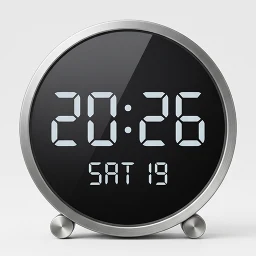
MovingClock — настольные часы
Часы с крупным дисплеем, голосовые оповещения и информация о погоде.
XAPKИнструменты
✓Kiểm tra tương thích trên thiết bị của bạn
0.0/ 10
- 0
- Загрузки
- 0
- Обзоры
- v1.0
- Последняя версия
Скачать
Preparing APK and XAPK…0%
ПРЕДПРОСМОТР ПРИЛОЖЕНИЯ
Скриншоты MovingClock — настольные часы
Листайте, чтобы посмотреть
О приложении MovingClock — настольные часы
1. О приложении Приложение превращает ваш смартфон в часы с крупным текстом, который хорошо виден издалека. Плавная анимация при смене времени создает ощущение премиального продукта. Время синхронизируется ежедневно для максимальной точности. Неиспользуемые старые смартфоны обретают новую жизнь в качестве стильных часов. Установив приложение как заставку, вы сможете видеть время даже во время зарядки. Отслеживайте важные даты с помощью счетчика обратного отсчета (D-Day). Попробуйте использовать старый смартфон из ящика как настольные часы.
2. Основные функции Поддержка множества языков (английский, корейский, японский, китайский, итальянский, испанский, немецкий, французский, хинди, португальский, русский, тайский, вьетнамский). Автоматическое масштабирование размера текста в зависимости от размера экрана. Настройка цвета фона и текста. Выбор стиля, толщины и размера шрифта. Настройки отображения: только время, формат AM/PM, показ секунд. Функция защиты от выгорания экрана (сдвиг изображения через заданные интервалы). Блокировка ориентации экрана (альбомная/портретная). Различные форматы даты (автоматически подстраиваются под выбранный язык). Настройка часового пояса и отображение местного времени. Отображение счетчика обратного отсчета (D-Day). Автоматическая синхронизация времени (раз в день; также доступна ручная синхронизация). Настройки отключения экрана (минимальная яркость) — до 2 настраиваемых периодов. Режим часов при зарядке (доступен через системные настройки заставки; показывает статус зарядки). Ежечасные голосовые оповещения (при настроенном движке Google TTS). Голосовое объявление времени системного будильника. Отображение текущей погоды — автоматическое определение местоположения или ручной ввод.
3. Советы по использованию Рекомендуется отключить экстренные оповещения и сообщения о бедствиях в настройках SMS (их получение может привести к отключению экрана). При подключении к интернету (Wi-Fi) время синхронизируется и отображается максимально точно. Если в настройках смартфона включена автоматическая яркость экрана, яркость часов будет регулироваться в зависимости от окружающего освещения. У некоторых старых смартфонов батарея может вздуться при длительном подключении зарядного устройства (более 6 месяцев). Регулярно проверяйте состояние батареи. (Например, Galaxy S5 вздувался, а Galaxy Note 5 — нет). Продлить срок службы батареи можно, включив функцию защиты батареи в настройках смартфона (доступно на Android 12, Galaxy S10 и выше).
4. Совместимые устройства Работает на устройствах с Android версии 7 или выше (см. примеры ниже). Samsung: Все модели Galaxy S6/A6/Note 5 и выше, Tab A7 и выше, все модели Tab S (рекомендуется Galaxy Note 5 и выше). Google: Все модели Pixel. Xiaomi: Все модели, включая MI 3, Mi Pad 3 и выше (рекомендуется MI 7 и выше). LG: Смартфоны G4, V10 или выше.
- ↗Часы с крупным дисплеем, голосовые оповещения и информация о погоде.
Что нового в версии v1.0
- The app icon has been changed.
- Added a feature to display the time in a single line in portrait mode.
- Weather API changed (OpenWeatherMap -> Open-Meteo), Please reset the weather settings.
ОЦЕНКА СООБЩЕСТВА
0.0/10
Review for MovingClock — настольные часы
0.0/10 from 0 reviews
ИСТОРИЯ ВЕРСИЙ
Предыдущие версии MovingClock — настольные часы
KHÁM PHÁ RIÊNG CHO BẠN
Cá nhân hóa có kiểm soát
Lịch sử được lưu trong trình duyệt; server chỉ xử lý tín hiệu đã giới hạn để trả gợi ý và không lưu hồ sơ cá nhân.Đang nhận diện Android và ABI từ trình duyệt…
Cá nhân hóa đã tắt.
SoftSri sẽ không ghi nhớ app vừa xem hoặc danh mục thường truy cập trên trình duyệt này.
Phổ biến tại quốc gia của bạn
Xu hướng theo khu vực đã chọn.
Tiếp tục khám phá
Dựa trên app và danh mục bạn vừa xem.
MovingClock — настольные часы
Открытия
Все ↗Похожие приложения
02
Приложение

Персонализация
TV Launcher Premium Smart UI
Smartago
★ 9.1
Varies
03
Приложение

Инструменты
MultiApp Ultra: Dual Space
waxmoon
★ 8.8
Varies
04
Приложение
Инструменты
Signage Setup Assistant
Samsung Electronics Co., Ltd.
★ 7.0
Varies
05
Приложение

Инструменты
Publisher - Постинг в соцсети
Smartvision
★ 8.6
Varies
06
Приложение

Инструменты
Katty
ZEER Studio
★ 8.2
Varies
07
Приложение
Инструменты
пульт для телевизора LG
Quanticapps FZ LLE
★ 6.1
Varies
08
Приложение
Инструменты
Remote for Philips Sound Bar
Mobile-Care
★ 6.3
Varies