
RILIS TERBARU
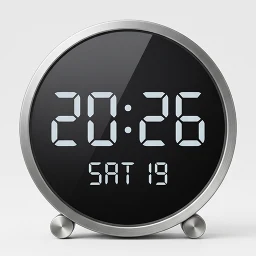
MovingClock - Desk Clock
Perindah tata letak meja kerja Anda dengan jam meja pintar. Mendukung screensaver.
XAPKAlat
✓Kiểm tra tương thích trên thiết bị của bạn
0.0/ 10
- 0
- Unduhan
- 0
- Ulasan
- v1.0
- Versi terbaru
Unduh
Preparing APK and XAPK…0%
PRATINJAU APLIKASI
Tangkapan layar MovingClock - Desk Clock
Geser untuk menjelajah
Tentang MovingClock - Desk Clock
1. Tentang Menyediakan layar jam dengan teks besar yang mudah dilihat dari jarak jauh. Saat waktu berubah, efek animasi yang halus memberikan kesan premium. Menyinkronkan waktu setiap hari untuk menampilkan waktu yang akurat. Ponsel pintar lama yang tidak terpakai dapat diubah menjadi jam yang keren. Jika Anda memasang screensaver, Anda dapat memeriksa waktu bahkan saat mengisi daya. Lacak hari-hari penting Anda dengan tampilan penghitung Hari-H. Coba gunakan ponsel pintar lama yang tersimpan di laci Anda sebagai jam meja.
2. Fungsi Utama
Dukungan multibahasa (Inggris, Korea, Jepang, Cina, Italia, Spanyol, Jerman, Prancis, Hindi, Portugis, Rusia, Thailand, Vietnam) Rasio teks skala otomatis berdasarkan ukuran layar Warna latar belakang dan teks yang dapat disesuaikan Gaya font, ketebalan, dan ukuran teks yang dapat disesuaikan Opsi tampilan: Hanya waktu, AM/PM, dan pengalih detik Fitur pencegahan burn-in layar (menggeser layar pada interval khusus) Penguncian orientasi Lanskap/Potret Berbagai format tanggal (diperbarui secara otomatis berdasarkan bahasa yang dipilih) Penyesuaian zona waktu dan tampilan waktu lokal Tampilan penghitung mundur Hari H Sinkronisasi waktu otomatis (sekali sehari; sinkronisasi manual didukung) Pengaturan layar mati (meminimalkan kecerahan layar) - hingga 2 periode terjadwal Tampilan jam pengisian daya (tersedia melalui pengaturan screensaver sistem; menampilkan status pengisian daya) Peringatan suara setiap jam (tersedia saat mesin Google TTS dikonfigurasi) Pengumuman suara waktu alarm sistem Tampilan info cuaca saat ini — Deteksi lokasi otomatis atau input manual
3. Tips Penggunaan Kami merekomendasikan untuk mengubah Peringatan Darurat atau Atur pengaturan pesan teks "Bencana" ke 'Dinonaktifkan' di pengaturan pesan teks Anda (layar mungkin mati jika Anda menerima pesan yang tidak perlu). Jika terhubung ke Internet (Wi-Fi), waktu akan disinkronkan dan menampilkan waktu yang akurat. Jika Anda mengatur kecerahan layar ke otomatis di pengaturan ponsel cerdas Anda, kecerahan jam akan secara otomatis menyesuaikan dengan cahaya sekitar. Untuk beberapa ponsel cerdas lama, baterai mungkin membengkak jika pengisi daya terhubung dalam jangka waktu lama (lebih dari 6 bulan). Harap periksa kondisi baterai secara berkala. (Galaxy S5 menunjukkan pembengkakan, Galaxy Note 5 tidak) Anda dapat memperpanjang masa pakai baterai dengan mengaktifkan fitur perlindungan baterai di pengaturan ponsel cerdas Anda (Android 12, Galaxy S10 atau lebih tinggi).
4. Perangkat yang Tersedia Berfungsi pada perangkat dengan Android versi 7 atau lebih tinggi (lihat contoh di bawah).
Samsung: Semua Galaxy S6/A6/Note 5 dan di atasnya, Tab A7 dan di atasnya, semua model Tab S (Galaxy Note 5 dan di atasnya direkomendasikan).
Google: Semua model Pixel.
Xiaomi: Semua model termasuk MI 3, Mi Pad 3 dan di atasnya (MI 7 dan di atasnya direkomendasikan).
LG: Ponsel pintar G4, V10 atau yang lebih tinggi.
- ↗Perindah tata letak meja kerja Anda dengan jam meja pintar. Mendukung screensaver.
Yang baru di versi v1.0
- The app icon has been changed.
- Added a feature to display the time in a single line in portrait mode.
- Weather API changed (OpenWeatherMap -> Open-Meteo), Please reset the weather settings.
RATING KOMUNITAS
0.0/10
Review for MovingClock - Desk Clock
0.0/10 from 0 reviews
RIWAYAT VERSI
Versi lama MovingClock - Desk Clock
KHÁM PHÁ RIÊNG CHO BẠN
Cá nhân hóa có kiểm soát
Lịch sử được lưu trong trình duyệt; server chỉ xử lý tín hiệu đã giới hạn để trả gợi ý và không lưu hồ sơ cá nhân.Đang nhận diện Android và ABI từ trình duyệt…
Cá nhân hóa đã tắt.
SoftSri sẽ không ghi nhớ app vừa xem hoặc danh mục thường truy cập trên trình duyệt này.
Phổ biến tại quốc gia của bạn
Xu hướng theo khu vực đã chọn.
Tiếp tục khám phá
Dựa trên app và danh mục bạn vừa xem.
MovingClock - Desk Clock
Temukan
Lihat semua ↗Aplikasi serupa
02
Aplikasi

Personalisasi
TV Launcher Premium Smart UI
Smartago
★ 9.1
Varies
03
Aplikasi

Alat
MultiApp Ultra: Dual Space
waxmoon
★ 8.8
Varies
04
Aplikasi
Alat
Signage Setup Assistant
Samsung Electronics Co., Ltd.
★ 7.0
Varies
05
Aplikasi

Alat
Publisher - Постинг в соцсети
Smartvision
★ 8.6
Varies
06
Aplikasi

Alat
Katty
ZEER Studio
★ 8.2
Varies
07
Aplikasi
Alat
LG Smart TV Remote Control
Quanticapps FZ LLE
★ 6.1
Varies
08
Aplikasi
Alat
Remote for Philips Sound Bar
Mobile-Care
★ 6.3
Varies